

How much do I really study?
Average focus time per day is often lower than people expect, which makes planning more honest.
The statistics page breaks your focus sessions down by day, month and all time. See how many sessions you completed, how much of your time was focus rather than breaks, your average per day and your progress toward a daily target.
Free account required. Statistics are built from the timer sessions you complete while signed in.
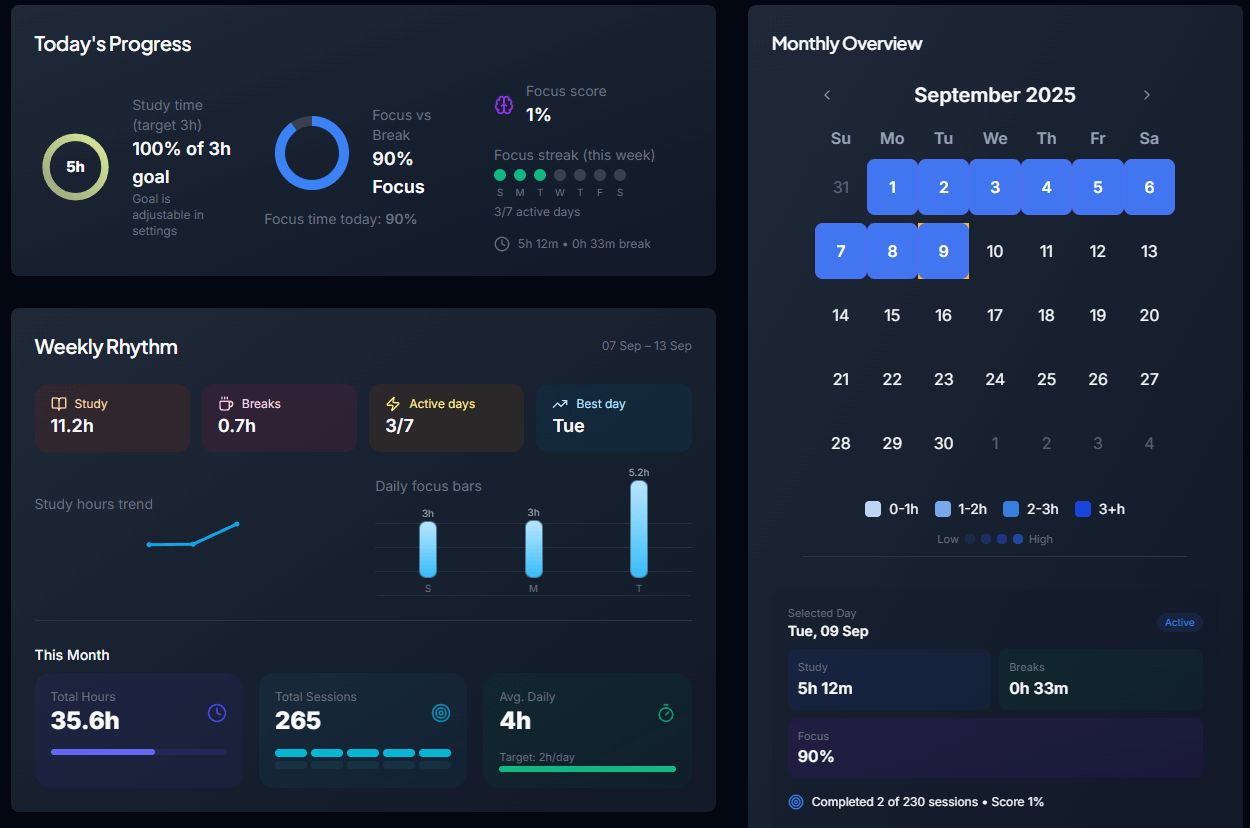
Today's progress: study time against your daily target (3 hours by default, adjustable in settings), focus versus break time and your focus streak for the week. Weekly rhythm: study and break hours, active days, your best day, a study-hours trend and daily focus bars.
This month: total hours, total sessions and average per day. Monthly overview: a calendar shaded by study hours, where selecting a day shows its study, break and focus figures. Lifetime statistics: totals since you started.
Use statistics to answer specific questions, such as whether you study more on weekdays or how long your average session really is, rather than chasing higher numbers for their own sake.
Complete Pomodoro or focus sessions in the signed-in timer so each one is recorded.
After studying, look at study time against your target and the split between focus and breaks.
Use daily focus bars and the monthly overview to see your pattern over weeks.
If sessions are often cut short, try shorter blocks; if breaks run long, set a fixed break length.
Average focus time per day is often lower than people expect, which makes planning more honest.
The monthly overview shows heavy and light days at a glance.
Focus versus break time shows whether breaks are eating into study blocks.
Compare this month with last month to see whether a new routine is sticking.
A student's statistics show 2 hours of focus and 1 hour of breaks on most days. They switch from open-ended breaks to fixed 5-minute short breaks and a 15-minute long break. Two weeks later a larger share of their session time is focus, and they reach their daily target more often without spending longer at the desk.
See study time, streaks and course progress on one dashboard.
Use your session data to tune focus length, breaks and weekly plans.
Compare mood with study hours and see your best and hardest days.
Log study hours by subject and see where your week actually went.
It shows what share of your timed session was spent in focus compared with breaks. Use it to compare days and adjust break length, not as a measure of learning.
From timer sessions you complete while signed in. Guest timer sessions are not saved to your account.
Yes. The daily target starts at 3 hours and can be adjusted in settings to match your own goal.
Yes. Lifetime statistics show your total sessions and time since you started using the timer.
This page describes the statistics view itself. The Pomodoro analytics page explains how to use those numbers to adjust session length, breaks and weekly planning.
Yes. Statistics are included in a free AcademyNC account.
Read the privacy policy and terms for information about your account and stored work.
Sign in, complete one timer session and open your statistics to see the first day of data.