

Session length
Frequent unfinished 25-minute blocks suggest trying 15 or 20 minutes; easy, uninterrupted blocks suggest trying 45 or 50.
Every Pomodoro you complete while signed in adds to your analytics. Use them to answer practical questions: is 25 minutes the right length for you, are your breaks too long, and which days of the week do you actually study?
Free account required. Analytics include timer sessions completed while signed in; guest sessions are not saved.
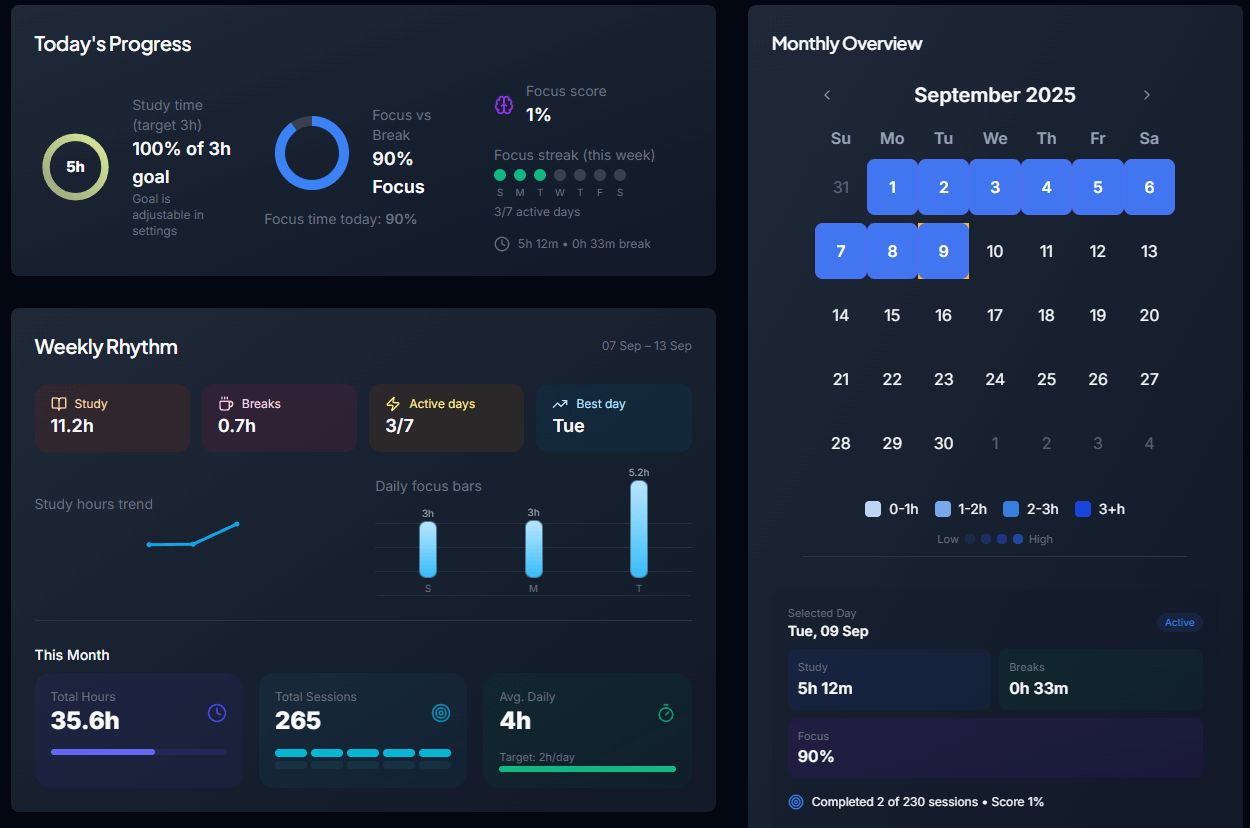
Focus versus break time shows what share of each session goes to work. If breaks regularly take a third of your time, the technique is turning into a timer for breaks. Weekly rhythm shows study and break hours, active days and your best day, with daily focus bars to compare days side by side.
Monthly totals give total hours, total sessions and average per day, and the monthly calendar shades each day by hours studied so streaks and gaps stand out. Today's progress compares your study time with a daily target you can adjust in settings.
For a plain-language read of your study hours, pace and course balance, the AI study coach can analyse the same logged time and suggest what to change next.
Use the signed-in timer for every study block so your analytics reflect your normal routine.
If breaks are long, fix the break length; if sessions end early, try a shorter focus block.
Use weekly rhythm and the monthly calendar to see which days carry most of your study.
Adjust session length, break length or daily target, then compare the next two weeks with the last.
Frequent unfinished 25-minute blocks suggest trying 15 or 20 minutes; easy, uninterrupted blocks suggest trying 45 or 50.
A low focus share usually means breaks are running over. Set fixed 5-minute breaks and a longer break after four rounds.
Set the daily target near your real average, then raise it gradually as you meet it.
Put demanding work on your strongest days and keep lighter review for days that are usually quiet.
A student's analytics show 25-minute sessions almost always completed and short breaks often running to 10 minutes. They switch to 40-minute sessions with fixed 8-minute breaks. After two weeks their daily study time is similar but a larger share of it is focus, and they reach their daily target on more days.
Review focus score, daily focus bars and lifetime totals.
Work in focused blocks with short and long breaks between them.
Get plain-language feedback on your study hours, pace and course balance.
Log study hours by subject and see where your week actually went.
They track the timer sessions you complete while signed in: study and break time, focus versus break share, sessions, active days, best day, daily focus bars, monthly totals and a monthly calendar of study hours.
Look at how often you finish sessions and how much of your time is focus. Frequently abandoned sessions suggest shorter blocks; consistently easy sessions suggest you can try longer ones.
Yes. The daily target starts at 3 hours and can be adjusted in settings.
No. Sessions are saved to your analytics only when you use the timer while signed in.
The AI study coach can review your logged study hours, weekly pace and course balance and suggest next steps. It is a separate tool from the analytics view.
The study statistics page describes the statistics view itself. This page focuses on using those numbers to adjust session length, breaks and weekly planning.
Read the privacy policy and terms for information about your account and stored work.
Run two weeks of signed-in sessions, then use your analytics to change one thing.